
How to Write an IT Resume That Gets Noticed
A strong IT resume is more than a list of technologies. It should help a recruiter quickly understand what you can do, what you have worked on and how your work helped a team or business.
This matters whether you are applying for your first software job, moving into cloud or cybersecurity, or looking for a more senior role. Hiring needs change, but a clear resume still depends on the same basics: relevant skills, honest experience and specific examples.
In 2026, candidates should also show that they can work effectively with AI tools, cloud platforms, data and security—where these skills are relevant to the role. Employers are increasingly looking for people who can apply technology to real work, not just name tools on a profile. LinkedIn’s 2026 skills report highlights technical AI skills alongside collaboration, communication and risk management.
What Should an IT Resume Include?
A practical IT resume usually includes:
- Name and professional contact details
- A short professional summary
- Relevant technical skills
- Work experience or internships
- Projects with your contribution and results
- Education
- Certifications relevant to the target role
You do not need to include every detail about your life. Keep the information focused on the job you want.
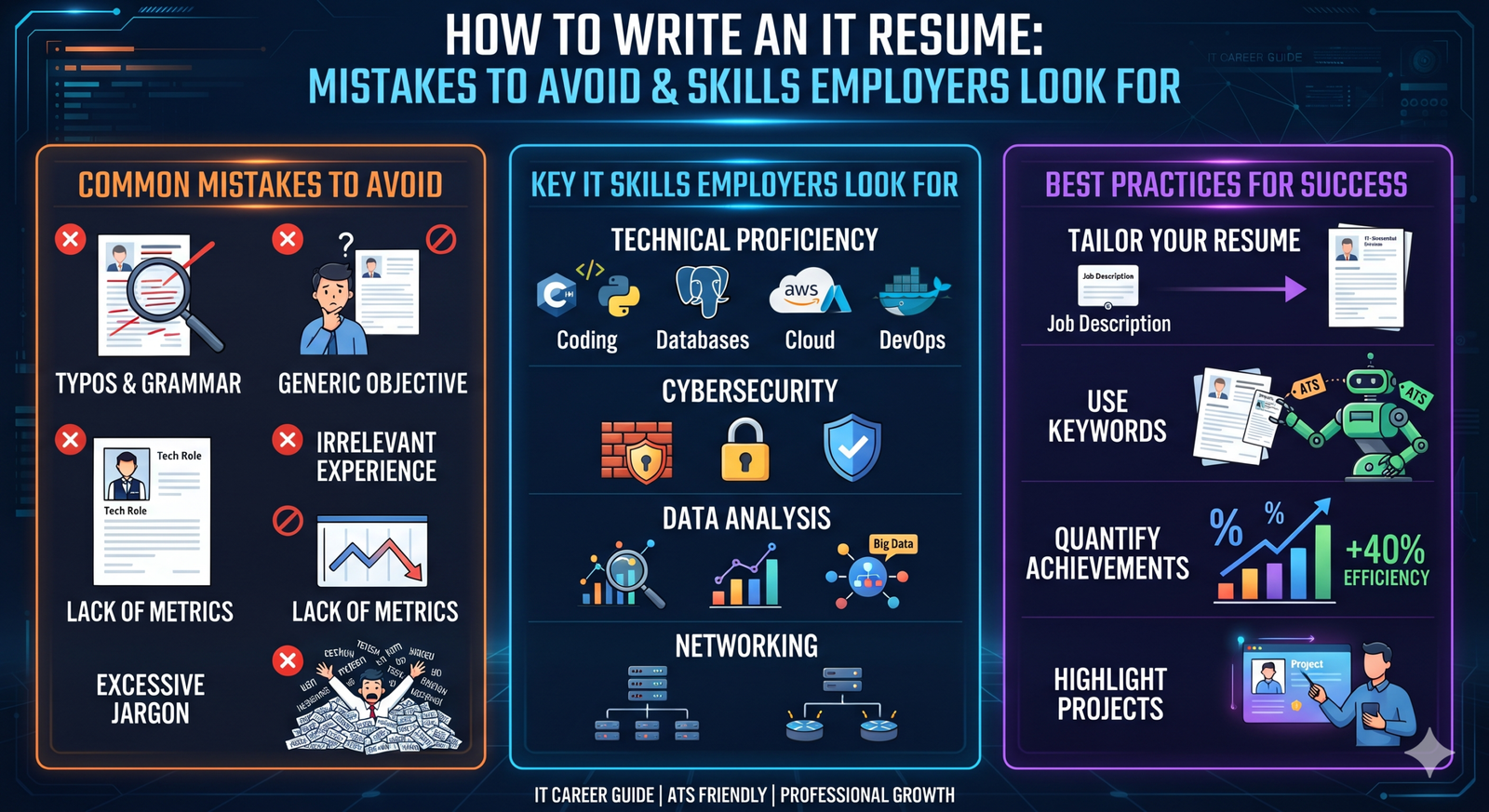
Common IT Resume Mistakes to Avoid
1. Sending the Same Resume for Every Job
A cloud engineer, data engineer and frontend developer are assessed on different skills. A generic resume can hide your strongest experience.
Before applying, compare your resume with the job description. Move the most relevant skills and achievements higher, and use accurate terms from the description where they match your experience. Tailoring your resume means highlighting relevant work—not pretending to have experience you do not have.
2. Listing Tools Without Showing How You Used Them
A skills section that says “Python, AWS, Docker, SQL, Kubernetes” does not explain your ability level or experience.
Add context in your work history or projects:
Too vague:
Worked with Python and AWS.
More useful:
Built a Python data validation job on AWS that checked daily file arrivals and alerted the team when required fields were missing.
Use examples that describe your actual contribution. Do not claim results you cannot explain in an interview.
3. Writing Responsibilities Instead of Results
Recruiters need to see what changed because of your work. Wherever possible, include a clear outcome: time saved, errors reduced, systems supported, data processed or releases improved.
Weak:
Responsible for maintaining CI/CD pipelines.
Stronger:
Maintained CI/CD pipelines for 12 services and added automated checks that reduced manual release steps.
Use numbers only when you can support them. If you do not know the exact impact, describe the scale or the improvement accurately without inventing a percentage.
4. Using a Long, Unfocused Summary
A summary should quickly tell the reader what role you are targeting and what strengths you bring. Avoid broad statements such as “hard-working professional seeking a challenging opportunity.”
Example:
Junior backend developer with hands-on experience building REST APIs using Java, Spring Boot and PostgreSQL. Created two personal projects with authentication, validation and unit tests; seeking an entry-level backend role.
Experienced professionals can mention their specialization, relevant technologies and the kind of systems they have delivered.
5. Adding Skills You Cannot Discuss
A long list of fashionable technologies can create trouble if an interviewer asks how you used them. Include skills you can explain with a real example, project, course or clearly stated beginner-level practice.
Separate skills by category, such as:
- Programming languages
- Cloud and infrastructure
- Databases
- Frameworks and APIs
- Testing and monitoring
- AI and data tools
Be honest about your level. A small, relevant skills section is stronger than a list of tools copied from job advertisements.
6. Making the Resume Difficult to Scan
Very small fonts, dense paragraphs, decorative graphics and inconsistent headings make important details harder to find. Use clear section titles, consistent dates and readable spacing.
A simple, single-column layout is usually easy to scan and tends to work well when resumes are parsed by hiring software. Use text labels for contact details instead of placing essential information only inside icons or images.
7. Including Unnecessary Personal Details
Keep the resume focused on your professional qualifications. Avoid adding sensitive personal information or details that are not required for the application. Follow the employer’s instructions if a specific form or document is requested.
8. Leaving Errors and Placeholder Text
Typos, broken links, inconsistent dates and leftover notes such as “add project here” can make a resume appear unfinished. Check:
- Spelling of technology names and certifications
- Employment and education dates
- Email address and phone number
- Portfolio, GitHub and LinkedIn links
- Formatting after exporting the document to PDF
Ask someone else to review it before you start applying.
9. Overstating AI-Generated Work
AI tools can help with brainstorming, proofreading or reorganizing a draft. The final resume must still describe your own work accurately. Be ready to explain every project, code sample and result listed.
If you used an AI tool in a project, explain what you built, what the tool did, how you checked its output and what decisions you made yourself.
IT Skills to Build in 2026
There is no single list of skills that guarantees an IT job. The right skills depend on the role, the employer and your experience. Still, current reports point to a few areas worth watching.
The World Economic Forum lists AI and big data, networks and cybersecurity, and technological literacy among the fastest-growing skill areas through 2030. It also highlights analytical thinking, adaptability and continuous learning.
A 2026 Linux Foundation report notes that organizations need more than AI knowledge: production AI also depends on platform engineering, cloud, cybersecurity, operations and cost management.
1. AI Literacy and Practical AI Skills
For many roles, AI literacy means knowing where AI tools can help, where they can fail and how to review their output. Depending on your specialization, useful experience may include:
- Using coding assistants responsibly
- Building or integrating applications that use language models
- Working with APIs and structured prompts
- Testing model output for accuracy and safety
- Understanding retrieval-augmented generation (RAG) basics
- Protecting sensitive data when using AI tools
You do not need to add “AI expert” to your resume just because you have tried a chatbot. Describe the specific task, tool and result.
2. Cloud and Platform Fundamentals
Cloud knowledge remains useful across software, data and operations roles. Choose a platform relevant to your target jobs—such as AWS, Microsoft Azure or Google Cloud—and learn the services that fit your work.
Useful foundations include:
- Compute, storage and networking
- Identity and access management
- Containers with Docker
- Kubernetes fundamentals where relevant
- Infrastructure as code, such as Terraform
- Logging, monitoring and deployment basics
- Cloud cost and security awareness
A project that deploys an application or data pipeline is more persuasive than a list of cloud service names alone.
3. Cybersecurity and Secure Development
Security is part of everyday IT work, not only a separate job function. Developers, cloud engineers and data teams can benefit from understanding access control, secrets management, dependency risks and secure configuration.
Depending on your target role, build familiarity with:
- Authentication and authorization
- Secure handling of credentials
- Vulnerability scanning
- Network and cloud security basics
- Privacy and data protection
- Secure coding practices
The Linux Foundation’s 2026 report identifies cybersecurity and compliance as areas where many organizations continue to report capability gaps.
4. Data, SQL and Analytics
Data skills are useful even when the job title does not include “data.” Many IT roles involve reading logs, querying databases, checking application behaviour or reporting on performance.
Consider strengthening:
- SQL and relational database concepts
- Python or another language used in your field
- Data cleaning and validation
- APIs and data formats such as JSON
- Basic statistics and visualization
- Data privacy and governance
For data engineering roles, add the tools mentioned in relevant job descriptions—such as Spark, orchestration platforms or cloud data services—and show how you used them in a pipeline.
5. Software Engineering Fundamentals
Frameworks change, but strong fundamentals remain valuable:
- One programming language used deeply
- Data structures and problem-solving
- Version control with Git
- API design and integration
- Unit and integration testing
- Debugging and code review
- Database design
- Basic system design for your level
A 2026 technology hiring survey reported that programming, AI/LLM applications, backend and APIs, databases, testing and quality, and cloud/platform skills are among areas developers are learning or applying. The exact priorities vary by role.
6. Communication and Problem-Solving
IT work often involves explaining technical decisions, investigating incidents and coordinating with people outside your immediate team. Clear writing, thoughtful questions, collaboration and adaptability can make your technical work more effective.
LinkedIn’s 2026 report also highlights cross-functional collaboration, stakeholder communication and risk management alongside technical AI skills.
Role-Based Skill Priorities
| Target role | Skills to consider |
|---|---|
| Software developer | One primary language, APIs, Git, testing, databases, debugging |
| Data engineer | SQL, Python, data modelling, ETL/ELT, cloud data platforms, orchestration |
| Cloud or DevOps engineer | Linux, networking, cloud, Docker, CI/CD, Terraform, monitoring |
| Cybersecurity analyst | Networking, identity, endpoint security, incident response, SIEM fundamentals |
| AI/ML engineer | Python, statistics, model evaluation, data pipelines, deployment and monitoring |
| QA or test engineer | Test design, automation, API testing, scripting, CI integration |
Treat this as a starting point. Check job descriptions for the roles and locations you are targeting, then prioritize the skills that appear repeatedly.
How Freshers Can Build an IT Resume
If you have limited work experience, use projects, internships, coursework and practical training to show what you can do.
For each project, include:
- The problem or purpose
- The tools and technologies used
- Your specific contribution
- A link to the code, demo or documentation, if available
Choose a small number of complete projects rather than many unfinished ones. A working application with tests and a clear README can demonstrate more than a long list of course names.
How Experienced IT Professionals Can Improve Their Resume
Experienced candidates should make their recent and relevant work easy to find. Highlight:
- Systems or services supported
- Technical decisions you influenced
- Reliability, performance or security improvements
- Scale, users, data volume or team context, when appropriate
- Mentoring, collaboration or ownership that relates to the target role
Use clear language and explain acronyms that may not be familiar outside your current company.
A Final Resume Checklist
Before sending an application, confirm that:
- Your resume matches the role you are applying for.
- Your most relevant experience appears near the top.
- Each listed skill is supported by an example or genuine experience.
- Project descriptions explain your own contribution.
- Results and numbers are accurate.
- The document is readable on a phone and computer.
- Links work and the PDF opens correctly.
- Your contact information is current.
- You have removed spelling errors and placeholder text.
Frequently Asked Questions
How long should an IT resume be?
Use the space needed to explain your relevant experience clearly. Keep early-career resumes concise; experienced candidates may need more room for substantial, relevant work. Remove repeated or unrelated details.
Should I include a photo on my IT resume?
Follow the application instructions and local hiring norms. If no photo is requested, prioritize space for skills, projects and experience.
Should I add every technology I have studied?
No. Prioritize technologies relevant to the job and be clear about your level. Add a tool only if you can explain how you learned or used it.
Are certifications enough to get an IT job?
Certifications can support your profile, but they are strongest when paired with practical work: a project, internship, contribution or clear example of applying the knowledge.
Should I mention AI tools on my resume?
Mention them when they are relevant to the role and you can explain how you used them. Be specific about your contribution and how you checked the output.
Conclusion
A strong IT resume connects skills to evidence. Choose a target role, highlight the experience that fits it, explain your projects clearly and keep every claim accurate. Build a few practical skills deeply, show what you can do with them and update your resume as your work grows.
Sources
- World Economic Forum, Future of Jobs Report 2025
- Linux Foundation, 2026 State of Tech Talent Report
- LinkedIn, Skills on the Rise: The Fastest-Growing Skills in 2026
- CoderPad, State of Tech Hiring 2026



Leave a Reply